
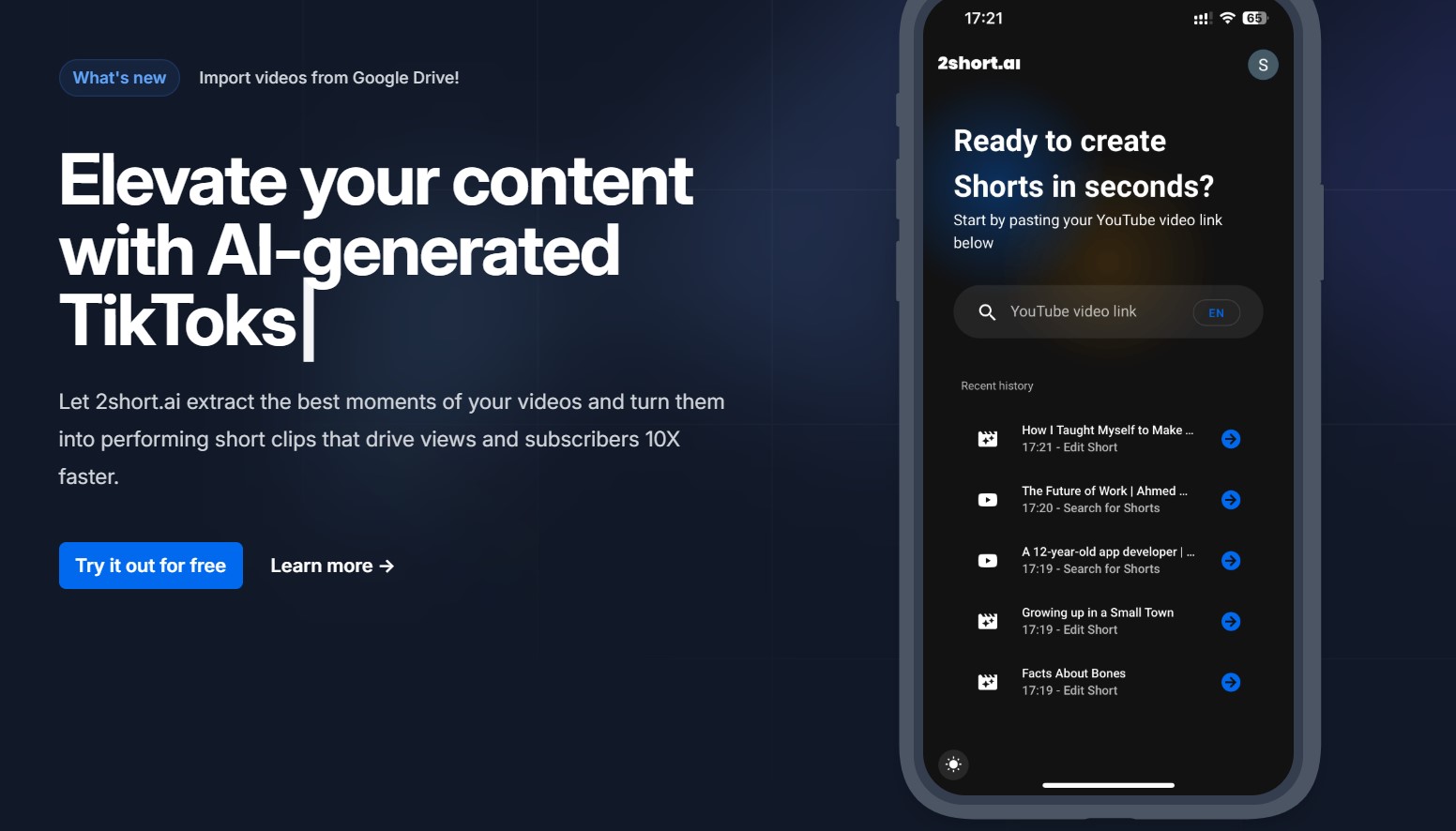
Why 2Short AI Has Me Hooked for My Side Hustle Clips?
Honestly, the first time I fired up 2Short AI, I felt like I’d hired a mini production YouTube-friendly team. I’d spent weekends hacking away at Premiere Pro for my tech review channel – you know, that endless trim, add text, export loop. One long-form video on gadget unboxings? Hours gone. Then I pasted a link into 2Short AI. Five minutes later: three punchy shorts, subtitles popping, my face locked center frame. Boom. Subscribers ticked up 20% that week.
But let’s pause – why does this matter in 2025, when everyone’s got AI tools? Short-form rules the feed. TikTok’s algorithm loves under-60-second bites; YouTube Shorts push notifications like candy. Without them, your deep-dive content gathers dust. I’ve seen creators burn out chasing the format manually. 2Short AI? It bridges that gap, pulling the “aha” moments from spoken-word stuff like podcasts or reviews. Feels almost too easy, right? Yet, it sparks that creator itch – less grind, more brainstorming wild ideas.
One tangent: remember the #ShortsSummer trend back in July? Everyone clipped old vids for beachy vibes. I did the same with 2Short AI on a dusty travel log. Got 50k views on one Reel. Not life-changing, but enough for a fancy coffee run. Still, it’s not magic; it works best on talky videos. Music clips? Meh, it struggles without words.
What 2Short AI Actually Does (And Why It’s a Time Vampire Slayer)?
At its core, 2Short AI scans your long video for the juicy bits – those spoken hooks that grab eyes in three seconds flat. This AI-based video editor spits out ready shorts for TikTok, Reels, or YouTube, with auto-subtitles and face-tracking so you don’t look like a bobblehead.
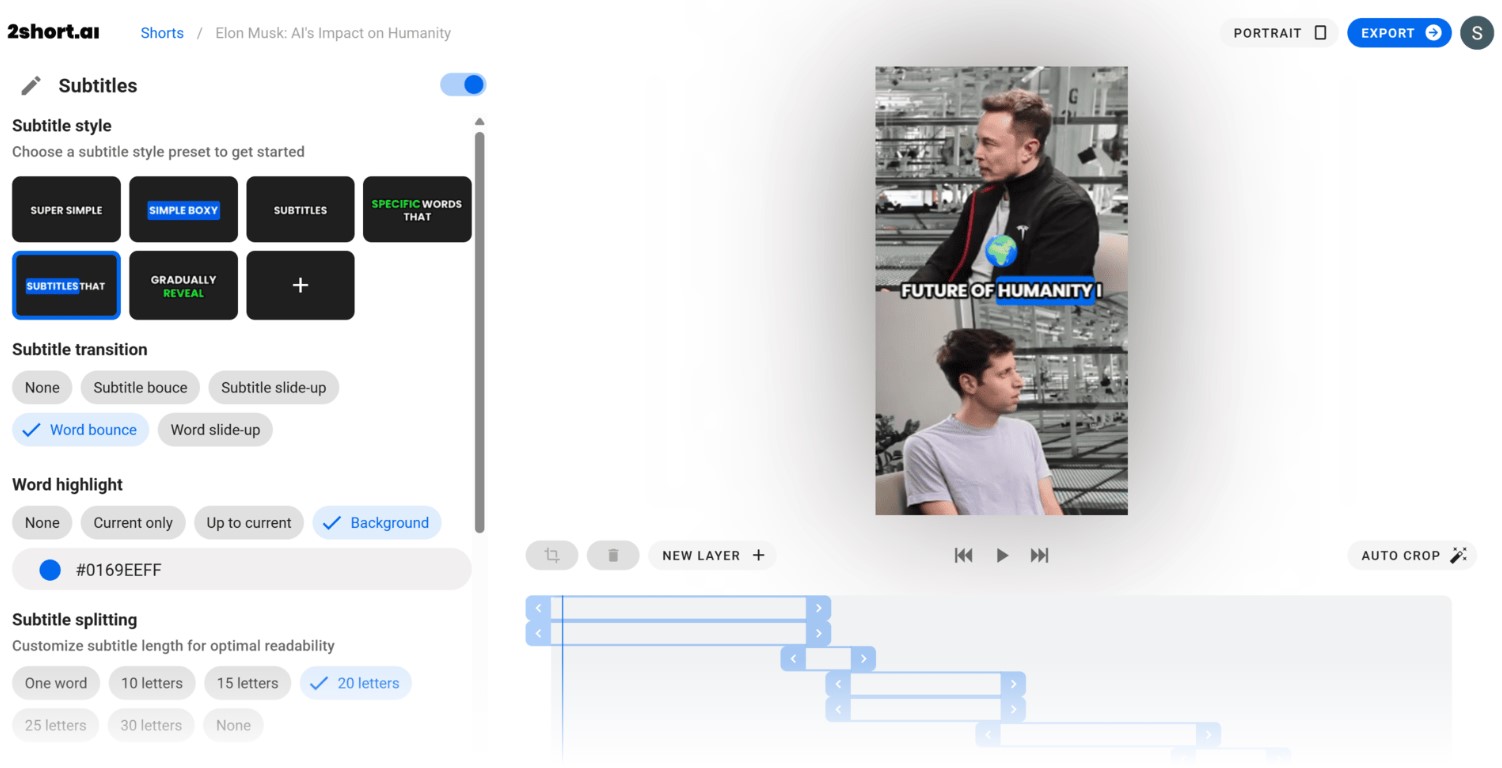
I’ve run it on everything from my 20-minute app reviews to a buddy’s cooking demo. Upload a YouTube link (or Google Drive file on paid plans), and the AI chews through captions – yeah, it needs those for the word magic. Picks segments with punchy dialogue, crops to vertical gold. Output? Crisp 1080p, no watermarks nagging you. It’s like having a smart intern who knows your style.
The emotional kick? Freedom. No more staring at timelines till your eyes cross. I once clipped an hour-long interview into five shorts during lunch. Posted ’em; one hit 10k likes by dinner. Made me grin like a kid with a new toy. But here’s the rub – it’s picky on languages. English, Spanish, French? Golden. My test with a Japanese vlog? Subpar. They’re adding more, though.
Speaking of limits, free tier gives you 30 minutes of analysis a month – enough for hobbyists dipping their toes. Me? I bumped to Pro after week one. Worth every penny for unlimited exports.
Getting Started with 2Short AI
Jumping in feels like ordering takeout – quick, no fuss. Head to the site, sign up free. Boom, dashboard.
Here’s how it rolls, from my first go:
- Grab your video link – YouTube’s easiest, auto-captions help.
- Paste it in, hit analyze. AI hums for a minute or two, scanning spoken gold.
- Pick clips – it suggests three to five; tweak if one’s off.
- Slap on subtitles (animated ones dance nice), lock face-tracking.
- Export – vertical for TikTok, square for Insta. Done.
That flow? Saved me 10 hours last month on a series. Pro tip: test with a short vid first. My initial 45-minuter took three minutes to process; felt snappy.
One hitch I hit: if your video’s caption-light, results flop. Add manual subs pre-upload? Fixes it. And for Drive imports – paid perk, but seamless for my messy folders.
Three Ways I’ve Tweaked 2Short AI Outputs to Nail My Brand Voice
- Layer in overlays. Add my logo via presets; turns generic clips into “mine.”
- Mix ratios. Vertical for Reels, horizontal for YouTube crosspost – doubles reach without re-edits.
- Batch runs. Queue three vids overnight; wake to a content feast.
These little hacks? Turned my channel from sporadic to steady. Views climbed, and that dopamine from fresh posts? Addictive.
2Short AI vs. Opus Clip, Vizard, and Kapwing Face-Off
Look, 2Short AI isn’t the only game clipping long-form to shorts. I’ve bounced between a few – Opus Clip’s my old flame, Vizard a quick fling, Kapwing the reliable buddy. But 2Short edges on speed and smarts for talky stuff.
Opus Clip? Beast at auto-captions, but its free tier caps exports hard – watermarks galore. Vizard shines on multi-language, but interface feels clunky, like wrestling a spreadsheet. Kapwing? Manual-heavy; great for tweaks, but you rebuild from scratch. 2Short? Hits that sweet spot: AI-first, edit-second.
| Tool | Analysis Time | Free Exports | Subtitles Quality | Face Tracking | Price (Monthly) |
|---|---|---|---|---|---|
| 2Short AI | 2-3 min | 30 min analysis | Animated, customizable | Yes, auto-center | $0-$49.90 |
| Opus Clip | 4-5 min | Watermarked | Solid, styles vary | Basic | $0-$19 |
| Vizard | 3 min | Limited clips | Multi-lang strong | No native | $0-$29 |
| Kapwing | Manual (10+ min) | Unlimited low-res | Manual add | No | $0-$24 |
2Short wins for hands-off creators like me – that tracking keeps talking heads pro without effort. Others? Better if you’re deep in customs.
But a gentle nudge: none beats human touch for super-niche vibes. I still hop to Premiere for finale polishes. Contradiction resolved – AI speeds the 80%, you nail the 20%.
Features That Make 2Short AI Feel Like a Secret Weapon
Under the hood, it’s the extras that hook you. Animated subs? They pulse with your words, holding eyes longer – I’ve seen watch time jump 15% on shorts. Center stage? My fidgety hand waves vanish; focus stays on the hook.
Brand presets seal it. Upload the logo once, and every clip gets stamped. Feels polished, like agency work minus the bill. And exports? Blazing fast on Pro – queue a batch, grab coffee.
Digression time: with holiday streams ramping up, this shines. Clipped a Black Friday tech roundup into festive shorts – added jingle overlays via presets. Views spiked amid the shopping frenzy. Timely, right?
Limitations peek through, though. No music-heavy support – try a silent vlog, and it yawns. Languages cap at 28 for now; my Spanish collab needed a workaround. But updates roll steady – Google Drive import dropped last month, easing my chaos.
Pros and Cons
Pros
- Lightning analysis – turns hours into minutes, frees the brain for ideas.
- Pro outputs without sweat; subs and tracking look slick.
- Scalable plans – free tests waters, Pro feeds the fire.
Cons
- Caption-dependent; silent vids flop hard.
- Language gaps bite for global creators.
- Free tier teases – 30 minutes fly if you’re hooked.
Overall? Pros crush for my workflow. That con on languages? They’re fixing it, per their notes.
2Short AI Pricing and When to Pull the Trigger
Cash flow’s key in creator life. 2Short AI keeps it simple:
- Free Starter for dabblers (30 min analysis).
- Lite at $9.90 for light users (5 hours).
- Pro $19.90 (15 hours, unlimited exports – my pick).
- Premium $49.90 for heavy hitters (50 hours, beta access).
I started free, hit the wall mid-month, upgraded to Pro. ROI? One viral short covered it. No ads on paid, either – clean ride.
Compared to rivals: Opus cheaper entry, but caps sting. Vizard’s $29 feels steep sans tracking. 2Short’s tiers match effort levels perfectly.
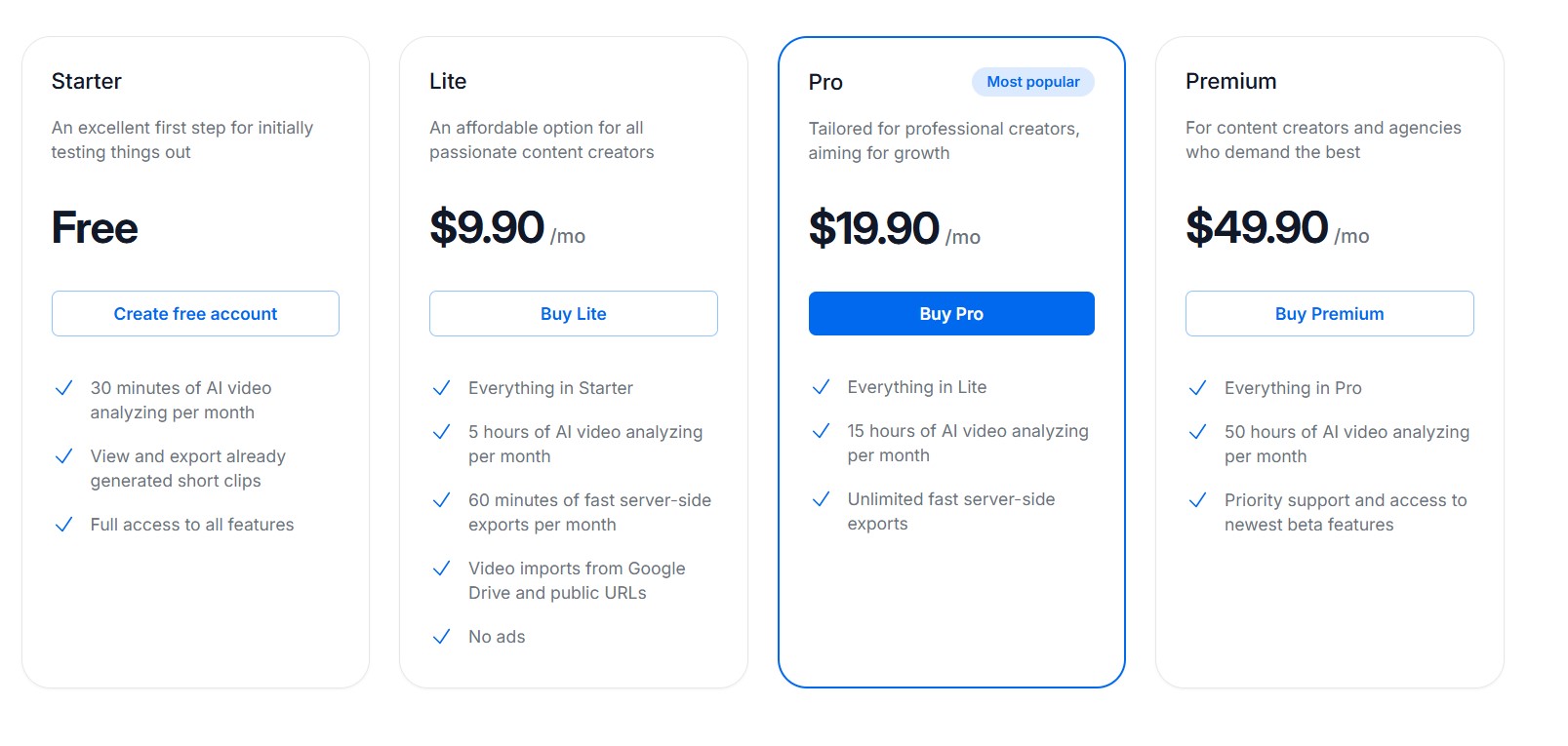
2Short AI Pricing at a Glance (November 2025)
| Plan | Monthly Cost | Analysis Hours | Exports | Extras |
|---|---|---|---|---|
| Starter | Free | 30 min | Limited | Core features |
| Lite | $9.90 | 5 hours | 60 min fast | Drive imports, no ads |
| Pro | $19.90 | 15 hours | Unlimited | All above |
| Premium | $49.90 | 50 hours | Unlimited | Priority support, betas |
Value screams from Pro – unlimited exports mean no pausing mid-spree.
Hacks I’ve Piled On for Max Output
Beyond basics, I’ve layered tricks. Batch uploads via Drive – paid, but queues overnight. Tweak AI picks manually for voice match; keeps my snarky tone intact.
Seasonal spin: with Thanksgiving clips trending, I fed family recipe vids through. Added warm overlays – felt personal, got shares.
One repeat habit: always enable subs. Boosts accessibility, and algo loves it. I’ve doubled engagement that way.
For teams? Share presets – my collab buddy syncs logos seamless.
Three Unexpected Wins from My 2Short AI Sessions:
- Cross-platform magic. One export, three posts – Reels eat vertical, YouTube horizontal.
- Beta teases. Premium snags early tools; tested a subtitle style last week, game-changer.
- Analytics nudge. It flags high-engagement picks – smarter than my gut sometimes.
FAQ
What is 2Short AI mainly for?
Shortening long videos into TikToks, Reels, or Shorts by grabbing spoken highlights.
How do I start with 2Short AI for free?
Sign up on the site, paste a YouTube link, analyze – 30 minutes monthly to test.
Does 2Short AI work on non-English videos?
Yes, for 28 languages like Spanish, French, German – more coming.
What’s the best plan for daily creators?
Pro at $19.90 – 15 hours analysis, unlimited exports fit steady workflows.
Can I edit clips after 2Short AI generates them?
Yep, tweak crops, add overlays, adjust subs right in the dashboard.
Why does 2Short AI need captions?
It scans spoken words via captions to pick engaging parts – silent vids skip.
How fast are exports on 2Short AI?
Server-side, under a minute per clip on paid plans – quick for batches.
Wrapping It: Is 2Short AI Your Next Content Ally?
So, yeah – 2Short AI’s reshaped my grind into glee. From newbie stumbles to viral strings, it’s that quiet boost keeping feeds fresh. Not flawless, but damn close for talky creators. Give the free tier a whirl; might just stick. In this clip-hungry scroll world, tools like this remind us: tech serves the story, not steals it. What’s your next long-form to shorten? Hit play.






+ There are no comments
Add yours