
Phrasly AI: What Even is an “AI Humanizer” and Why Do You Need One?
You know what? This whole AI detector thing is getting wild. We’re all messing around with tools like ChatGPT and Claude to crank out content faster, but then you hit a wall-that perfectly written, slightly robotic text gets flagged as 100% AI. It’s like your perfectly smooth robot waiter is suddenly giving off weird, uncanny valley vibes. That’s where Phrasly AI steps in.
The main gig is its AI Humanizer. Think of it as a style-and-syntax converter. You paste in that perfectly good but not great AI draft, and Phrasly’s proprietary models – which, get this, they trained on a huge database of real human writing – go to work. It doesn’t just swap out a few words; it essentially rearranges the furniture, adjusts the tone, and throws in those little grammatical quirks and varied sentence structures that scream, “A person wrote this!”
Let me explain. When AI tools write, they follow super predictable patterns, a bit like always hitting the same sequence of notes on a piano. Human writing, though? It’s jazzy. It has sudden stops, long meandering sentences, and maybe even a typo or two. Phrasly’s entire mission is to inject that unpredictability, that natural rhythm, back into the text.
How I Used Phrasly: The Workflow Vibe
My own experience was pretty straightforward, which is a huge plus. The interface is clean; you’ve got your input box, your output box, and a few buttons. No need for a 30-minute tutorial video. You drop your AI draft in, and then you get to pick your intensity level for humanization:
- Easy: This is for a quick polish. Good for SEO blog posts where you need to keep your core keywords and structure intact, but just want to smooth out the robotic edges. It focuses a lot on flow and readability.
- Medium: This is the sweet spot for most folks. It balances trying to bypass detection with keeping the content high-quality and readable. A great choice for academic work or professional articles.
- Aggressive: Need to absolutely, positively, fly under the radar? This is it. It makes the most drastic changes, which means it’s the most likely to fool a detector, but you gotta be careful. Sometimes, in its zeal not sound like a robot, it can actually complicate the meaning or introduce a weird phrase. Always, always give this one a quick read-through.
I primarily leaned on the Medium setting for a batch of rough drafts I got from another AI writer. Honestly, the results were genuinely impressive. The text didn’t feel like it went through a simple thesaurus swap – it came out sounding like I had spent an hour manually rewriting and editing. It saved me a ton of time, which, for a content person, is like finding gold.

Phrasly AI Features: More Than Just a Rewriter
Now, Phrasly isn’t a one-trick pony. The platform has evolved into a little suite of tools. You can tell the team is constantly tweaking things, trying to build a writing assistant that works for the whole workflow, not just one part of it.
The AI Detector: Checking Your Vitals
Before you even hit ‘publish,’ you can use their built-in AI Detector. They claim it’s incredibly accurate (99.8%, which is a big boast!). Look, no detector is perfect, and the whole cat-and-mouse game between writers and detection tools is a never-ending saga. But being able to check your own text right there in the platform? That’s just smart. It’s a great way to avoid those dreaded “false positives”-when your perfectly human writing gets flagged as AI just because it’s too clean or formal.
The Content Generator: Starting from Scratch
This is a neat little addition. You can actually use Phrasly to generate content from the jump. You give it a prompt, and it creates a piece of text that is already designed to be human-like and pass those detection checks. Plus, they offer real-time citations for academic and research-based content, which is a massive time-saver for students or folks doing professional reports. It crawls the web for sources, and then-get this-it includes the citations right there. That’s a powerful feature, especially if you’re trying to meet strict academic or journalistic standards.
Pages: The Integrated Workspace
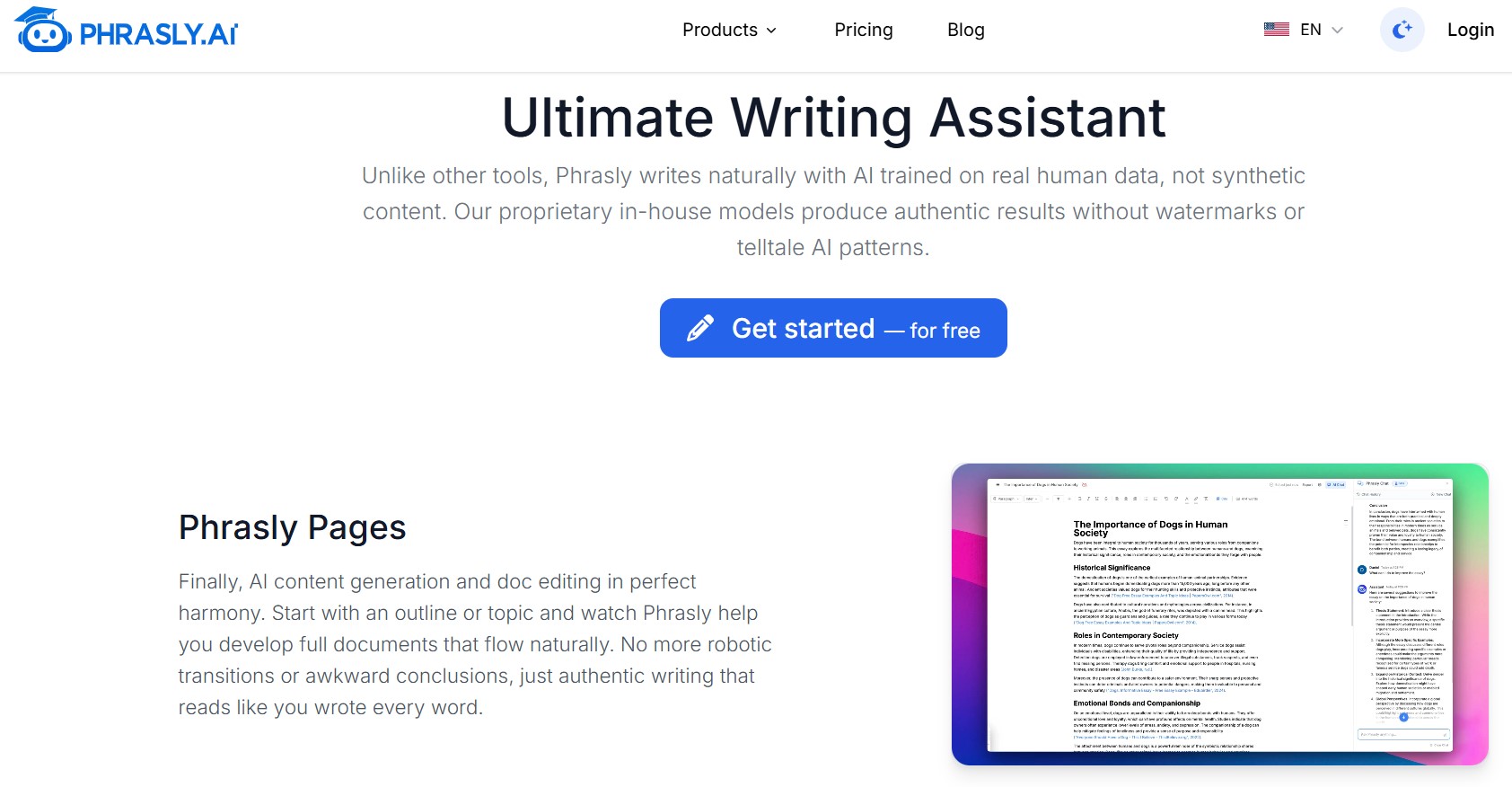
Phrasly has an editor called ‘Pages,’ which acts as your all-in-one writing hub. It’s got all the stuff you’d expect: dark mode, autosave, and multiple citation styles like APA, MLA, and Chicago. But the killer feature? It brings the Humanizer and Detector tools right into your document editor. You don’t have to keep pasting text back and forth between different tabs. Zero-tab switching for a faster workflow? Yes, please!
Phrasly vs. The Competition: Is It Worth Your Dime?
So, is Phrasly really the secret weapon everyone claims? Well, the thing is, the “AI humanizer” space is getting crowded. You’ve got alternatives like Undetectable.ai, WriteHuman, and even just high-end paraphrasers like QuillBot that have started adding “humanization” features.
The big difference, from what I’ve seen, is Phrasly’s focus on its own proprietary models. They’re not just rebranding a public model with a fancy interface. They built their tech to mimic human variation, not just semantic similarity.
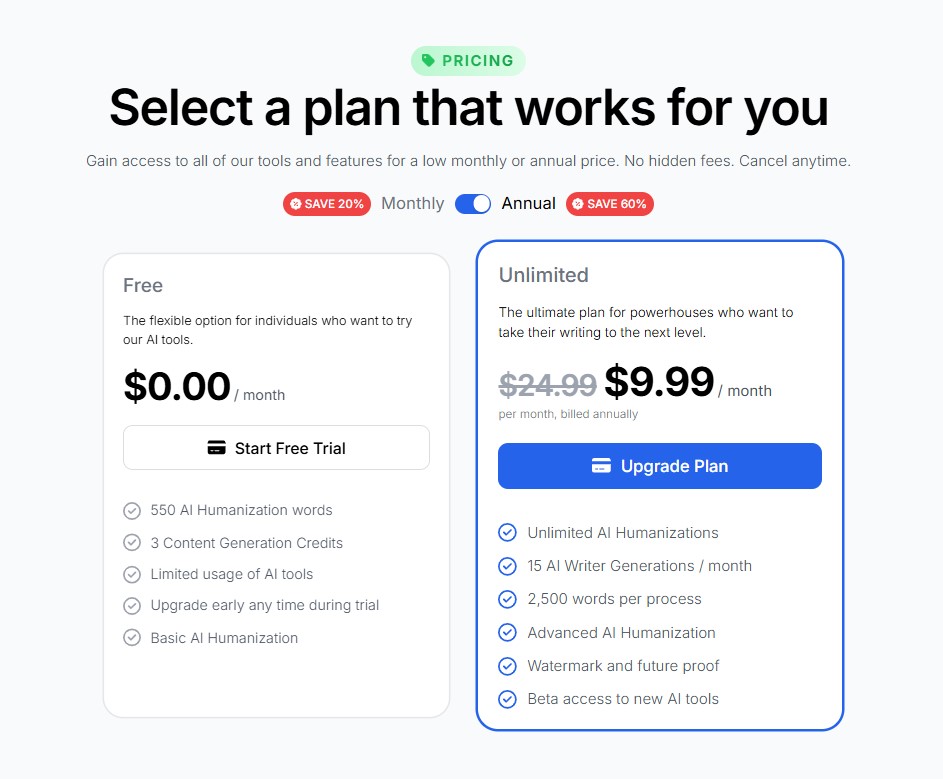
Here’s a quick-and-dirty comparison of Phrasly’s plans, because let’s be real, price matters.
| Plan | Key Features | Monthly Price (Approx.) | Best For |
| Free | 550 Humanization Words, Limited Tool Usage, Basic Humanization | $0 | Testing the waters, small projects |
| Unlimited | Unlimited Humanization, 2,500 words per process, 15 AI Writer Generations/month, Advanced Humanization | Starts at $24.99/month (or $9.99 if billed annually) | Power users, content agencies, and heavy academic use |
Note: Pricing can change, so always check the official site.
You see that Unlimited plan? That’s what sets them apart. They’re really big on the idea of truly unlimited usage, which, in a world where everyone else slaps on hidden caps, is a refreshing change. If you’re running a content farm (ethically, of course!) or a student with several big papers due, that unlimited word count is a lifesaver.
The Good, The Bad, and The “Wait, Really?”
Every tool has its quirks, right? Phrasly is no exception.
The Pros: What I Loved:
- The Feel of the Output: Seriously, the humanized text has a natural flow. It doesn’t just sound correct; it sounds engaging. It varies the sentence beginnings and lengths perfectly, hitting that high Flesch Reading Ease score without feeling dumbed down.
- Ease of Use: It’s so simple. The platform is clean, fast, and not cluttered with a million settings you’ll never touch. The user experience is honestly top-notch.
- The Suite of Tools: Having the Humanizer, Detector, and Content Generator all in one place-especially in the Pages editor-cuts out so much wasted time. That focus on workflow is a huge win.
The Cons: The Little Hang-ups
- Quality Check on “Aggressive” Mode: As I mentioned, when you push it to “Aggressive,” you must proofread. Sometimes, in the pursuit of undetectable text, a sentence can get a little clunky or lose a touch of its original meaning. It’s the trade-off for maximum evasion, I guess.
- Detection Inconsistency: Look, no humanizer works 100% of the time against every single detector. If a platform like Originality.ai or Turnitin releases a brand new model tomorrow, Phrasly’s models have to play catch-up. That’s just the reality of the game. They’re generally considered very effective, but perfection is a myth in this industry.
- Word Count Limits for Free Users: The 550 words for the free plan is a decent taste, but it’s really just a demo. You’ll definitely need to pony up for the paid plan if you’re doing any serious writing.
Why Phrasly AI Matters to the Everyday Writer?
We’re all in this new era of writing, right? It’s not about if you use AI; it’s about how you use it. For most of us, AI is a fantastic tool for getting a first draft done, busting through writer’s block, and generating a quick outline. But the content it spits out? It often lacks soul. It lacks the voice, the subtle sarcasm, or the unexpected tangent that makes a piece genuinely interesting to read.
Phrasly, at its heart, is a tool that helps you inject that soul back in. It’s about taking the efficiency of a machine and merging it with the warmth of a human.
Think about it this way: AI is like a really good, pre-fab house. It’s structurally sound and functional, but it has no personality. Phrasly is the interior designer who comes in and swaps out the sterile white walls for a bold color, throws in some mismatched but comfy furniture, and hangs up a few weird pieces of art. It takes the structure of the AI draft and gives it character.
And honestly, in the world of SEO and content marketing, character is what cuts through the noise. Search engines are constantly prioritizing helpful, reliable, and human-sounding content. Using a tool like Phrasly could very well be the difference between a blog post that ranks and one that just sits there, collecting digital dust.
FAQ
Does Phrasly work for academic papers?
Honestly, many students are using it to polish their AI drafts. It’s meant to improve flow and sound more human. But remember: your institution’s rules come first. Use it ethically – like a sophisticated editor, not a cheat code. Phrasly is very clear that they promote academic integrity.
How is Phrasly different from a standard paraphrasing tool like QuillBot?
That’s a good question. Standard paraphrasers generally focus on replacing synonyms and restructuring sentences to avoid plagiarism. Phrasly goes deeper; it uses models trained on human writing to eliminate those specific robotic patterns-the “low perplexity” stuff-that AI detectors look for. It’s a fundamental difference in what the tool is trying to fix.
Can Phrasly bypass all AI detectors?
Look, the truth is, no tool can promise 100% detection proof forever. It’s an arms race! Phrasly is definitely one of the most effective tools out there, often passing popular checks like GPTZero and TurnItIn. But you should always use the built-in AI Detector to confirm your text is good before submission.
What kind of content works best with Phrasly?
It works great for just about anything: blog posts, articles, student essays, marketing copy, and even emails. Basically, if the original AI text sounds a little flat or too formal, Phrasly can give it a necessary personality transplant.
Is there a word limit when I use Phrasly?
If you’re on the free trial, you have a limited word count (about 550 words for humanization). If you get the paid, Unlimited plan, they claim it’s truly unlimited, which is pretty rare in this space. You can process up to 2,500 words per single process or prompt, though.
Does Phrasly offer a grammar or plagiarism check?
Yes and no. It improves grammar and flow as part of the humanization, but it’s not a dedicated grammar checker like Grammarly. For plagiarism, they offer a Content Generator feature that finds real-time citations, which helps ensure originality in research papers.
Who created Phrasly?
Phrasly was founded by a team led by Ankur Goyal. It’s a US-based company, which is neat. They were built specifically to address the problem of AI detectors flagging perfectly good content.
If you’re using AI for content creation right now and spending hours manually editing the text to make it sound less robotic, Phrasly could save you a serious amount of time and headache. Go check out the free trial; see what you think. It just might be the ghost editor you never knew you needed.






+ There are no comments
Add yours