
Munch AI: The Tool That Claims to Fix Your Editing Burnout
Look, editing video is a grind. I used to spend hours scrubbing through timelines just to find that one thirty-second moment where I actually sounded smart. It’s exhausting. You finish recording a podcast or a long stream, and the last thing you want to do is watch your own face for another four hours. That’s where the hype around automation comes in. I kept seeing ads and Twitter threads about this tool called Munch AI, promising to take that heavy lifting off my plate.
The premise is pretty simple: you feed it a long video, and it spits out vertical, captioned clips ready for TikTok, Instagram Reels, or YouTube Shorts. It sounds great on paper, right? But I’ve tested enough “magic” AI tools to know that half of them are just glorified crop tools that cut off your forehead.
So, I gave it a real shot. I uploaded some old footage to see if it could actually understand context or if it was just chopping up video at random intervals.
The thing is, we are in this weird phase of the internet where quantity often beats quality. Algorithms are hungry. If you aren’t posting every day, you basically don’t exist. That pressure is real. Tools like Munch AI are supposed to be the answer to that “feed the beast” mentality without burning out.
How Munch AI Handles the Heavy Lifting?
The workflow is surprisingly straightforward. You don’t need a degree in video production to figure it out. You link your YouTube account or upload a file directly. Then, you wait. And yes, you do wait. It’s not instant. The AI has to “watch” the video.
Once it’s done processing, you get a dashboard full of clips. But here is the cool part-it doesn’t just give you random segments. It assigns a “Munch Score” to each clip. This is basically the Munch AI predicting how well that specific clip will perform based on current trends and keywords.
Does the score actually matter? Honestly, it’s hit or miss. Sometimes it flags a clip as “High Potential” simply because I said a trending keyword like “AI” or “Crypto,” even if the sentence itself was boring. But other times, it genuinely found the funniest part of the conversation that I had totally forgotten about.
Here is what the process looks like once you are in:
- Content Analysis: The AI transcribes everything. It looks for topics that are trending on social media right now.
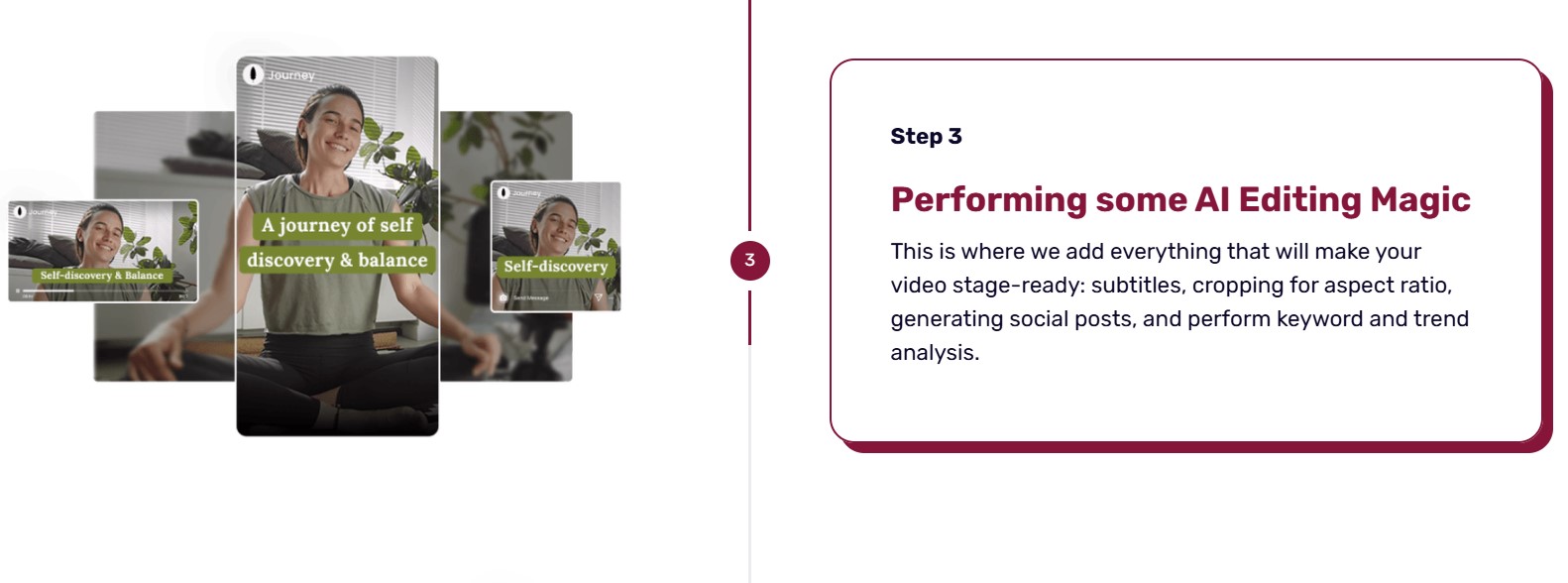
- Smart Cropping: It automatically centers the speaker. If you have two people talking, it tries to switch between them or keeps both in frame.
- Captioning: It slaps on those Alex Hormozi-style captions everyone is obsessed with. You know the ones-big, colorful, popping up word-by-word.
It feels a bit like having an assistant editor who does the rough cut for you. You still need to check their work, but the boring part is done.
The Reality of “AI Curation”
Let’s talk about the “AI” part. Is it actually intelligent? Sort of. It uses GPT (Generative Pre-trained Transformer) technology to understand the context of what is being said. This is crucial because standard video editors don’t know what words mean. They just know audio waveforms. Munch analyzes the text transcript to determine where a thought begins and ends.
This solves a huge problem with older automated tools: cutting people off mid-sentence. Nothing ruins a clip faster than a jagged cut where the speaker hasn’t finished their point. Munch is surprisingly good at finding the natural pauses.
However, it’s not perfect. I had a few clips where the joke relied on a setup that happened ten seconds prior, and the Munch AI cut the setup. So, I had a punchline with no context. You can fix this in the editor, but it reminds you that a human brain is still better at understanding humor than a computer is.
Comparison of Video Repurposing Tools
| Feature | Munch AI | Opus Clip | Manual Editing (Premiere/DaVinci) |
| AI Curation | High (Context & Trend aware) | High (Context aware) | None (You are the AI) |
| Setup Time | Fast (2-5 mins) | Fast (2-5 mins) | Slow (Hours) |
| Caption Quality | Excellent | Good | Perfect (But manual) |
| Cost | Mid-Tier | Budget-Friendly | Expensive (Time or Software) |
| Trend Analysis | Yes (Munch Score) | No | No |
Who is Munch AI Actually For?
I’ve been thinking about this. If you are making cinematic travel vlogs, this isn’t for you. The cuts are too quick, and the focus is on dialogue, not visuals.
But if you are a:
- Podcaster: This is a no-brainer. You have hours of talking. You need shorts.
- Coach or Consultant: You probably do webinars or Zoom calls. Those can be turned into content marketing assets.
- Streamer: It works for Just Chatting segments, but it might struggle with gameplay if the audio is chaotic.
The tool is built for “talking head” content. That’s its lane.
Why Contextual Intelligence Matters?
Most people overlook this, but the “Contextual Intelligence” feature on their site is a big deal. The AI doesn’t just look for loud moments; it looks for coherent thoughts.
When I tried using basic cutters before, I’d get clips that were technically sound but logically gibberish. Munch AI seems to grasp the theme. If I’m talking about “productivity hacks,” it groups sentences related to that. It even generates the hashtags and the caption for the social post based on that analysis.
That is a time saver. Writing descriptions for Instagram is one of those tiny tasks that drains your soul. Having a draft ready to go is nice.
Is Munch AI The Best Tool For You?
This is the big question. There are free tools out there. You can even use CapCut and do a lot of this manually if you are fast.
But Munch AI is selling time. That’s the product.
The interface is clean. It’s not cluttered with a million buttons you will never use. You get your clips, you have a simple editor to tweak the text or the crop, and you export.
One thing that bugged me slightly was the aspect ratio switching. Sometimes, if I moved my head too much in the original video, the “smart crop” would jitter a bit trying to follow me. It felt a little seasick. You can lock the frame, but then you might drift out of the shot. It’s a balancing act.
Also, let’s be real about the “Viral” claims. No tool can guarantee virality. That is marketing speak. A boring video is still a boring video, even if it has colorful subtitles. Munch can polish a turd, but it can’t turn it into gold. It just makes sure the turd is formatted correctly for TikTok.
Pros and Cons of Munch AI
Pros:
- Saves hours of scrubbing through footage.
- Captions are 95% accurate out of the gate.
- The “Trend” analysis gives you a hint of what might work.
- Direct integration with platforms saves a few clicks.
Cons:
- The price might be steep for a hobbyist just starting out.
- Smart crop struggles with excessive movement.
- Sometimes misses the setup of a joke.
The Tech Behind the Magic
I nerd out on this stuff, so bear with me. Munch combines computer vision with NLP (Natural Language Processing).
Computer vision handles the visual part – keeping your face in the center of the vertical frame. NLP handles the audio, figuring out what is important.
What’s interesting is how they integrate marketing data. They claim to analyze marketing trends to pick the clips. This suggests the Munch AI is connected to some sort of live data stream regarding what hashtags or topics are spiking. That is a sophisticated layer that most basic editors don’t have. Most editors are offline; they don’t know that “Grimace Shake” is trending. Munch theoretically does.
My Experience with the Munch AI Editor
Once the Munch AI picks the clips, you aren’t stuck with them. You can click “Edit.” The editor is browser-based. It’s lightweight. You can change the font style of the subtitles to match your brand colors. This is important because if every video looks like generic AI slop, people scroll past. You want it to look like you made it.
I found the text correction easy. If the AI hears “Munch” but types “Lunch,” you just double-click the word and fix it. It’s like editing a Google Doc. You don’t have to mess with a timeline layer.
| Feature | Availability | Note |
| Auto-Captioning | Yes | Supports multiple languages |
| Aspect Ratio Conversion | Yes | 9:16, 1:1, 4:5 |
| Social Media Sharing | Yes | Direct to TikTok/IG/YouTube |
| Brand Kit | Yes | Custom fonts/logos |
| Keyword Analysis | Yes | SEO focused |
The “All-in-One” Promise
The official website pushes this idea of being an “all-in-one” platform. And for the specific task of repurposing, it is. But don’t expect it to replace Adobe Premiere for your main content. You can’t really do complex sound design or color grading here. It’s a “finisher” tool. It takes a finished long product and slices it. It’s not for creating a long product from scratch.
I think a lot of people get confused by that. They think Munch AI will make the video for them. No, you still have to be interesting on camera. You still need good lighting and audio. Munch just handles the distribution logistics.
Let’s Talk Pricing and Value
I won’t list specific prices because they change, and you can check the site. But generally, it operates on a subscription model based on how many minutes of uploaded video you process.
If you are a solo creator posting once a month, it might not be worth it. But if you have a weekly podcast? The cost of Munch is likely way less than hiring a freelance editor on Upwork to make 10 clips.
There is a value in consistency. If paying for a tool forces you to actually post the clips because “I paid for it so I better use it,” then the ROI is infinite.
Is the Quality Good Enough for Professional Brands?
Yes, but you need to tweak. I wouldn’t let the AI auto-post without a human review. Sometimes the crop is awkward. Sometimes the caption covers someone’s face. You need to do a quality control pass. But that pass takes 5 minutes, whereas editing from scratch takes an hour.
For high-end brands, you might want more control over the motion graphics. But for personal brands, influencers, and businesses just trying to maintain a presence? It’s more than enough. It looks native to the platform.
FAQ
What file formats does Munch AI support?
It handles most standard video files like MP4 and MOV, and you can also paste YouTube links directly to import content without downloading.
Can I remove the watermark?
Yes, once you are on a paid plan, all exported clips are free of watermarks, making them look professional and ready for your brand.
Does it work for languages other than English?
It supports many major languages for transcription and captioning, though the trend analysis works best with English content currently.
How long does it take to process a video?
It depends on the length of your upload, but typically a one-hour video takes about 10 to 20 minutes to analyze and clip.
Can I edit the clips manually after Munch AI generates them?
Absolutely, there is a built-in editor where you can adjust the start/end times, fix caption typos, and change the cropping.
Is the subtitle style customizable?
You can change fonts, colors, and positions to match your specific brand style so it doesn’t look like generic AI content.
Does it post directly to social media?
Yes, it has integrations that allow you to schedule or post your clips directly to platforms like TikTok and Instagram from the dashboard.
Final Thoughts on the Workflow
My workflow shifted when I started using this. Instead of thinking “How do I edit this?”, I started thinking “How do I structure my recording so Munch has better clips to find?” I started leaving clearer pauses. I started making sure I had “hook” sentences. In a weird way, using the tool made me a better speaker because I knew what the Munch AI was looking for.
It’s a handy tool. It’s not magic, but it’s close enough to being useful. If you have a hard drive full of long videos gathering dust, throw them in there. You might find some gold you didn’t know you had.
And that’s the thing-content you’ve already made is an asset. Munch AI helps you liquidate that asset into attention.






+ There are no comments
Add yours