

Ideogram AI – A Brand New Image Generation Tool
If you require sharp images for social media with stylish texts readable inside the artwork, then look no further than Ideogram AI. This image generation tool has a few undeniable benefits that we couldn’t pass by without a review. So, let’s try to figure out how Ideogram AI works, how to use it, when to use it, and where it fits in the pantheon of image generation services powered by artificial intelligence. Is it safe to use daily? Is it free? Find out by reading this review up to the very end.
Major Ideogram AI Features and Services
Ideogram AI services are vast and interesting to explore if you’re into image generation due to enthusiastic or professional tasks. This service, in particular, feels like the Swiss Army knife for anyone who is tired of AI-generated images looking bad. The main features include:
- Text-Aware Generation
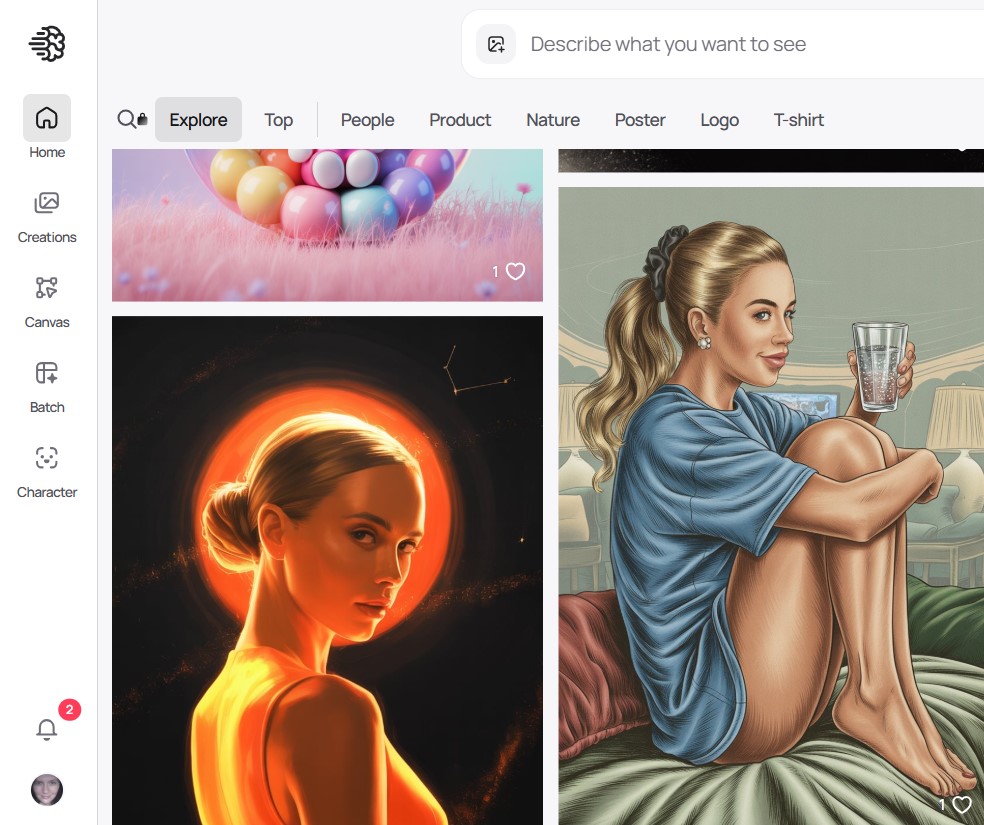
The most notable thing is how Ideogram AI generates images with clear, readable text. The tool can cope with logos to posters, and its AI models understand that text is not a decoration, but a message users need to understand. Other image generators mostly struggle to incorporate text messages into images. Ideogram hits this task perfectly every time. With Ideogram AI, you can create T-shirt slogans, badges, book covers, and signage without the need to correct the words manually afterwards.
- Magic Prompt – Your Creative Sidekick
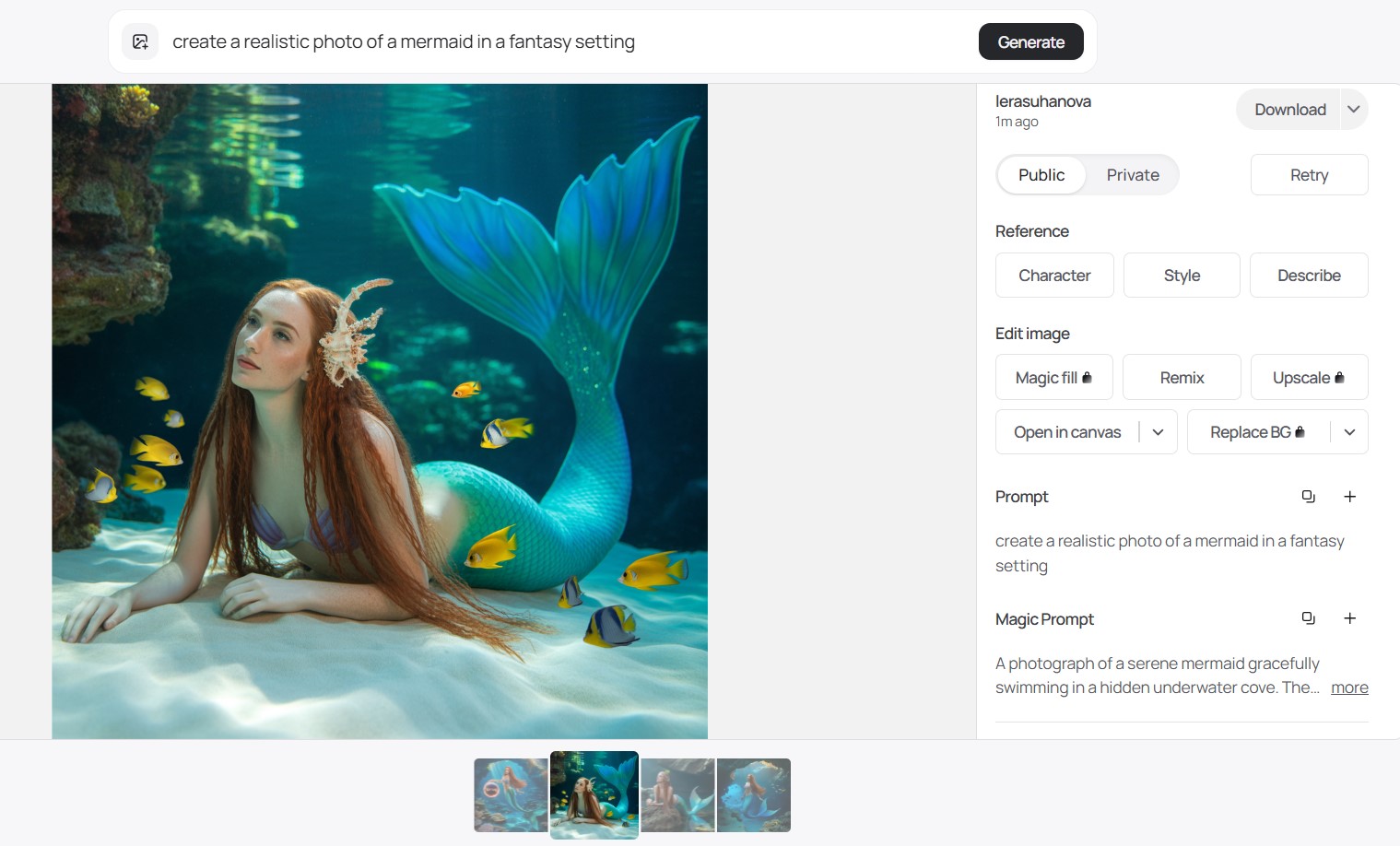
In some cases, it is daunting to begin with a brief prompt. The Magic Prompt is an in-built helper of Ideogram AI that converts vague or short ideas into detailed prompts. As an example, when you type in summer festival poster, it can be turned into a vibrant, sunlit festival scene, with diverse people dancing, large bold text in a modern font. This is like a shot of creativity when you are in a rut or need a better quality output with minimal manual work.
- Infinite Remix Canvas
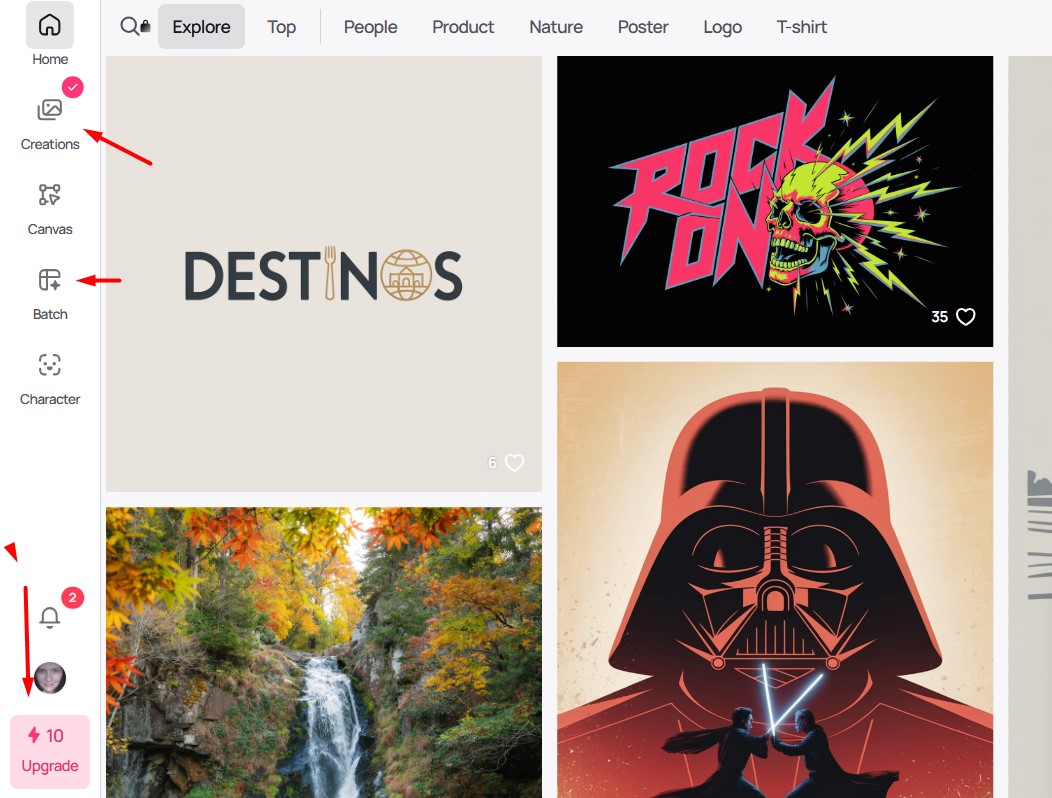
Once the AI spits out an image, the fun really begins. Ideogram’s Canvas tool lets you remix, extend, or fine-tune any part of the generated image. You don’t need to start over if the first version isn’t quite right. Do you need a bigger text? Or add a background? Change colors? All of these tweaks are possible directly from the Canvas, and with real-time previews. This feature supports the revision process and makes playing with ideas easy and addictive.
- Style Reference Uploads
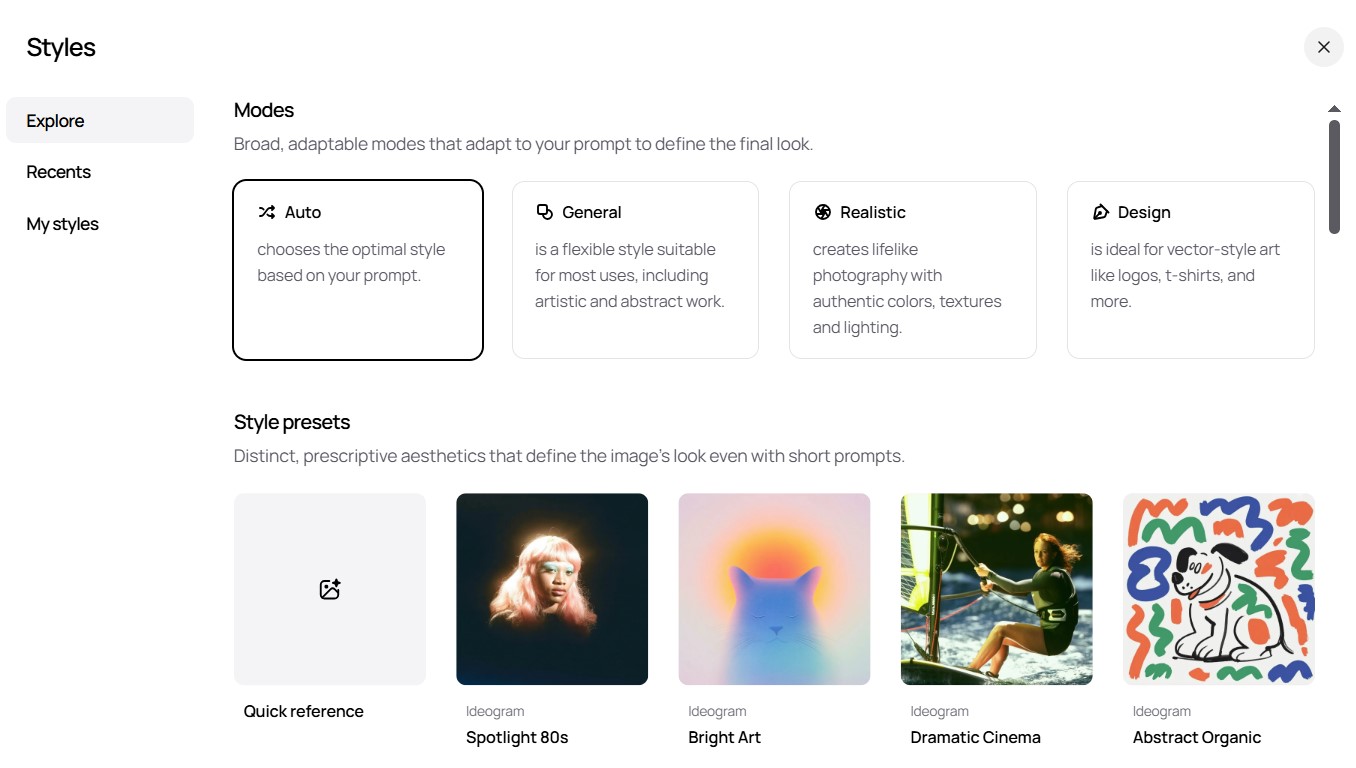
The brand’s visual consistency is important, and Ideogram AI understands that. You have the option of adding up to 3 reference images to get the character consistency in all upcoming generated images (available only for premium users). The AI model of Ideogram can combine your references in the image it generates – including brand colors, typefaces, and overall vibes. This option is ideal for teams that require integrated graphics with the same brand style across various media.
- Batch Generation for Supercharged Productivity
Do you need hundreds of pictures and images at the same time? The Pro and Team plans have a batch image generation option where you can upload a CSV file with the list of prompts. Ideogram can spin out as many as 500 images per request. Try this option for boosting your social media campaign. It is a game-changer for agencies and marketers who have to work with tight timelines.
- Background Removal & Switching
If you like creating layered designs, the built-in background removal feature of Ideogram AI allows you to select the subject or change the background immediately on the Canvas. This option simplifies the work of complicated visuals without the need to use extra photo editing software.
- Developer-Friendly API
Ideogram offers API access so web developers can add its AI models for image generation in their apps, websites, or automation pipelines. We’ve checked the API documentation, and it is simple, offering real-time inputs, style sheets, and batch processing. This option paves the way to custom tools that can dynamically create visuals without exiting your ecosystem.
- Character Consistency Tool
Sometimes you need to have uniform character images when narrating stories or creating brands. You may post one reference picture, and Ideogram AI keeps the appearance of that character in several pictures, even in other poses or scenarios. It is a new feature we are very excited about in terms of the narrative visual content.
IHO, using Ideogram doesn’t feel like wrestling with a machine and more like brainstorming with a smart, visual-savvy buddy who just understands how to get typography. It respects your time and input by trying really hard to get stylish fonts and words right. Intuitive tools of Ideogram AI remix and refine the styles for image generation. Use different tools to get the best results for your project whenever you require the AI-powered image generation.
Pros Of Ideogram
- Text looks amazing without mystery gibberish. The tool nails spelling and style integration.
- The generation is quick. Usually, the platform needs less than 30 seconds to deliver a great image. Just be precise with the prompt.
- Magic Prompt helps to make your simple prompts smarter without extra effort.
- We absolutely enjoyed Canvas Remix, which helps to fix the generated images instead of generating new ones.
- The free plan is okay. The free tier lets you fiddle with enough credits to understand the main tricks. But most Canvas editing tools are only for paid plans.
Cons of Ideogram
- Human faces still feel unnatural, sometimes looking uncanny or odd.
- Not many styles compared to Leonardo AI or Unstable Diffusion tools.
- Collaboration tools for teams are not enough, though; sharing is easy.
How to Use Ideogram AI?
The basic concept of Ideogram is simple. Just type your text prompt into the special window after signing up for the account. Then wait for the service to generate the images according to this prompt. Surely, you may need to edit the generated images later, but such functions are optional.
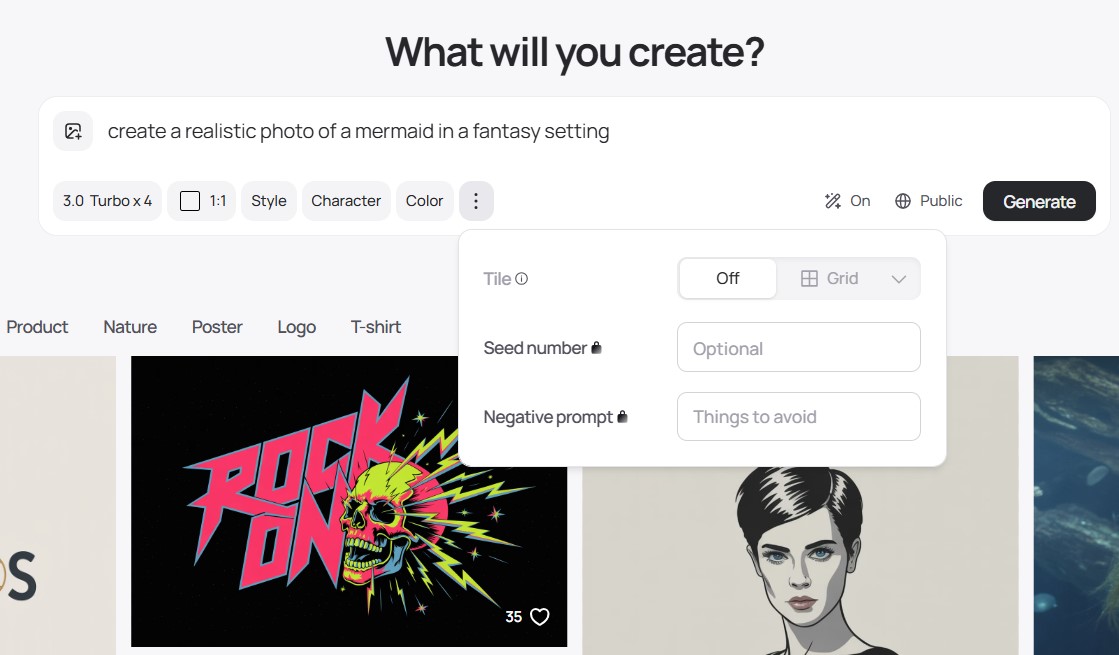
The major guide on how to use Ideogram AI includes only a few simple steps:
- Sign up for an account.
- Enter a detailed prompt (try using their Magic Prompt for help).
- Pick your style and aspect ratio.
- Generate and browse results.
- Open Canvas to tweak or extend your image.
- Download or share your creation.
This is our impression of the Ideogram tool. As content creators, we love to add great visuals to our blog articles. The tool handling typography with grace and precision became a savior for us. There is no steep learning curve; creation of polished designs is easy.
We love its crystal-clear, readable embedded text and interesting visual generations. Another great feature is batch generation within 30 seconds to get a few images with the same character consistency and style. No hidden menus or intimidating parameters. Just use the straightforward “type and create” flow. If you need more tips and guides about Ideogram AI, check this video tutorial.
User Cases for Ideogram AI
After a few hours of tests, we’ve come up with a few solid user cases where this tool is almost irreplaceable:
- Generate logo concepts and branding images with the readable text you can share with clients.
- Social media posts may include new, eye-catching images with quotes or catchy ad phrases. A great take for Instagram promos.
- Blog illustrations and custom images to prevent adding boring stock photos with embedded captions.
- Product mockups, stickers, planners, and digital products come alive with Ideogram’s realistic visuals.
Ideogram AI Pricing Plans
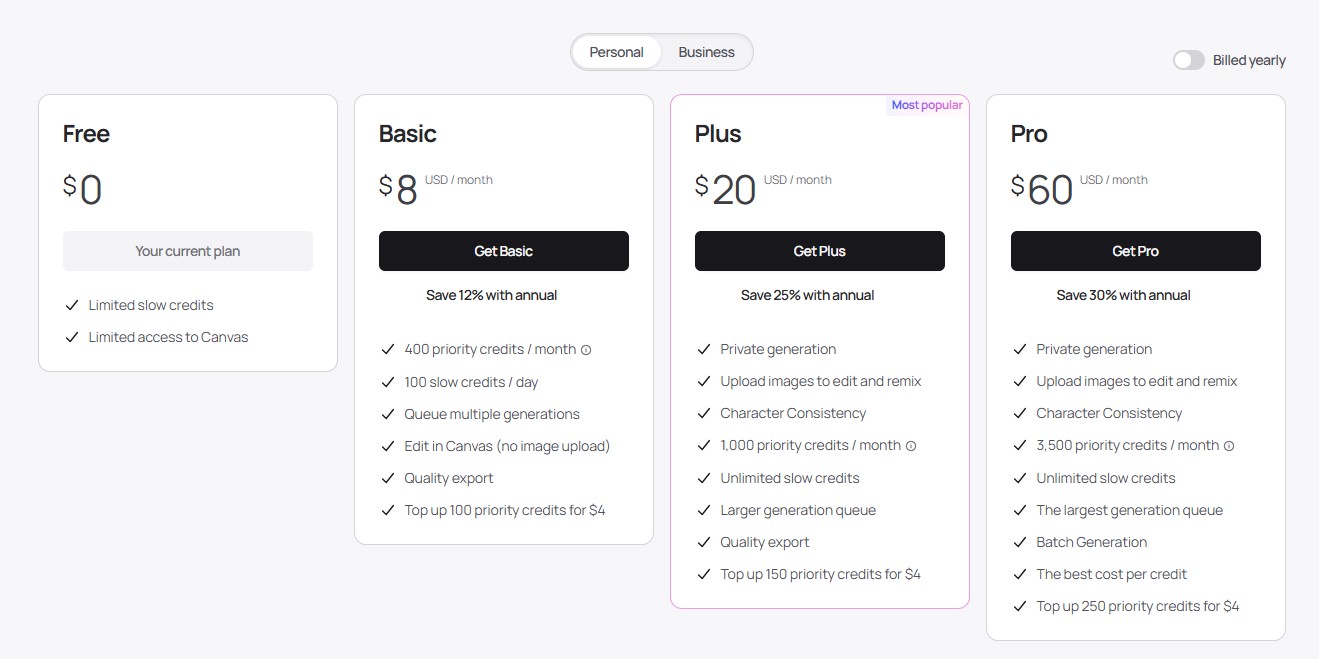
The service offers 4 tiers for registered users:
- Free Plan. You pay nothing for a limited toolset, slower generation, and a few editing tools.
- Basic Plan ($8 per month). You receive 100 slow credits for the image generation per day and 400 priority credits per month. You can edit in Canvas (without image upload). Every extra 100 priority credits costs an extra $4.
- Plus Plan ($20 per month). You get an option of private generation. You can upload your images for generation, editing, and character consistency. Also, you get 1000 priority credits per month.
- Pro Plan ($60 per month). The ultimate tier for small teams and professionals. Along with the features of other paid plans, you get 3,500 priority credits per month with unlimited slow credits.
We recommend starting with a free tier before paying for more advanced plans.
Quick Tips to Get the Best from Ideogram
If you are a beginner-friendly user, then you should understand how to use the Ideogram tool:
- Start with your prompts – they have to be detailed.
- Use the Magic Prompt helper whenever creativity blocks hit.
- Try uploading style references for a custom look that matches your brand or creative project.
- Use editing and remixing in the Canvas after the image generation. You can save a lot of time in such a way.
- Batch generate if you need to get a few image references in different styles for comparison.
Ideogram vs Midjourney vs Canva – Which Is Better?
There are many image generation tools powered by AI engines and models. Canva and Midjourney services are the brightest examples at this point. The following table reveals the comparison between these tools and Ideogram.
| Feature | Ideogram AI | Midjourney | Canva |
| Quality of Text Rendering | Crystal-clear, legible, stylistically integrated | Often blurry or misspelled text | Text is user-added, not AI-generated |
| Styles & Artistic Output | Basic styles + style reference uploads | Highly artistic, surreal styles, along with basic ones | Template-based graphic design tool – create your own style |
| Ease of Use | Intuitive prompt and Canvas for tweaking | Prompt-based, steeper learning curve | Drag-and-drop graphic editor |
| Remix & Editing | Infinite Canvas tool for in-image edits and extensions | Creates new images every time | Real-time graphic editing on user designs |
| Batch Processing | Yes, up to 500 images in one go (Pro/Team plans) | Limited batch via external scripts | Yes, but manual editing is still required |
| API Availability | Yes, developer-friendly API | Limited third-party integrations | Extensive integrations and plugins |
| Free tier | Yes, limited | Yes, limited | Yes, limited |
| Best For | Designing text-focused images like logos, posters | Artistic, fantasy, conceptual images | Marketing materials, presentations, social |
There is also a useful comparison of Ideogram vs Midjourney features on Reddit.
Summing up, Ideogram AI is a perfect specialized tool if you need to get the images for social media or a brand book. We absolutely love its prompt understanding, text over image generation, and editing options. Midjourney rules for surreal and highly creative art, but stumbles with text generation. Canva is kind of a multitool with all the features for a team’s image generation in batches. Batch generation of Ideogram AI is okay, but it lacks Canva’s speed and accuracy.
FAQ
Is Ideogram AI any good?
Yes, Ideogram is really unique when it comes to creating images with clear and readable text. It is among the few AI generators that will always spell and style words correctly within the visual artworks. It works best with marketing content, logos, social posts, and any design that has text in it. The Canvas Remix and Magic Prompt tools make the creative workflow smoother for all users of Ideogram AI. It is highly recommended for anyone who needs stylish typography and visual artwork at the same time.
Is Ideogram AI safe?
Ideogram is data-security conscious. The website encrypts and practices privacy measures that are in line with industry standards to secure user inputs and generated pictures. Based on their privacy policy, they do not sell user data or use it to advertise. In case of sensitive projects, they provide options to keep your work confidential. All in all, it is a safe tool both for personal and professional use.
Is Ideogram AI free to use?
Yes! Ideogram has a free version with access to simple text-to-image generation, remixing with the Canvas’s tools, and public galleries. The free version allows non-committal users or creators to test the waters. Paid plans offer more options like batch image generation, increased resolution downloads, API access, and additional styles.
Is Ideogram AI private?
Ideogram is all about privacy. Free users can have their generated content displayed in public galleries by default, but you can turn this off or select plans that will ensure your output remains private and non-public. Your prompts and pictures are safely stored, and the staff focuses on data policies controlled by the user. It is an ideal tool for completing business assignments or secretive creative assignments.
Conclusion
After a detailed exploration of Ideogram AI features, we’ve concluded that this tool is definitely worth your attention if you are into image generation. It is a simple-to-use tool with advanced features and unique options like typography and high-quality text rendering. No matter if you are a freelancer who needs logo ideas or a marketer who wants to push batches of social content with unique visuals, Ideogram AI can help to get personalized graphics and custom images of any kind.



+ There are no comments
Add yours